Liquidated · 24h
$9.93M
85% longs · 15% shorts
Expected liquidation levels from open interest, next to the liquidations that actually printed on Binance, Bybit and OKX.
Where open interest still on the books would be liquidated under the model. Not orders on the book. Hover a row to see it on the map.
| Level | Distance | Side | Expected at 25–100x |
|---|---|---|---|
| shorts · a rise liquidates | |||
| +8.76% | shorts | $1.37M | |
| +6.93% | shorts | $1.55M | |
| +5.36% | shorts | $1.43M | |
| +4.86% | shorts | $2.18M | |
| +3.36% | shorts | $2.60M | |
| $1,204 | last price · 18:30 UTC | ||
| longs · a drop liquidates | |||
| −3.36% | longs | $3.03M | |
| −3.53% | longs | $1.89M | |
| −5.27% | longs | $3.03M | |
| −7.68% | longs | $2.30M | |
| −9.09% | longs | $1.92M | |
A level price trades through leaves this table; on the map its band ends there and any liquidations that printed stay as orange or blue cells. How the model works
The free map is the last 24 hours. Pro, not on sale yet, will add the 7-day and 30-day windows, each leverage as its own layer, long and short levels in two colours, a mark where expected levels were hit, and CSV export of the inputs.
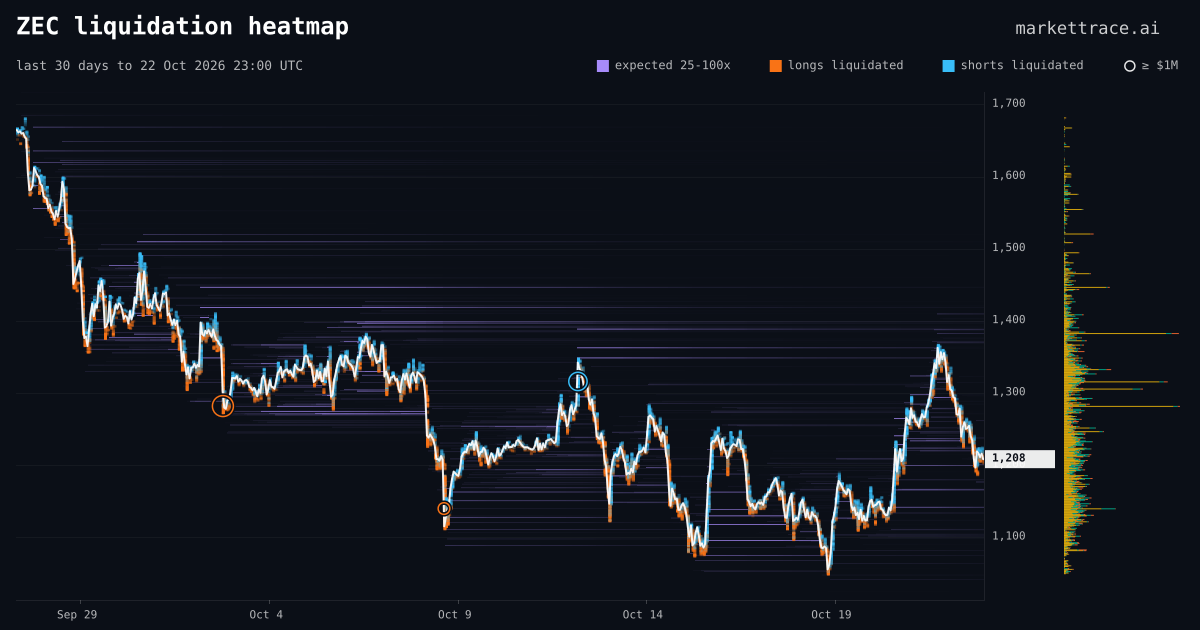
Two layers on one price chart: a model of open positions and a record of what the venues printed.
Time runs left to right, price bottom to top. Violet bands are expected liquidations still open; orange and blue cells are liquidations that printed; a ring marks $1M or more liquidated in one candle. The profile on the right and the tape below add the same prints up by price and by hour.
A band sits at the price where open interest that is still on the books would be liquidated, if it was opened at 25, 50 or 100x in equal parts. Brighter means more dollars at that price. A band starts when that open interest arrived and ends the moment price trades through it, because those positions are gone.
Every liquidation from Binance, Bybit and OKX, placed at its trade price where one is known and inside the step's price range where it is not. Orange cells are longs, forced out as price falls; blue cells are shorts, forced out as it rises. Intensity scales with the dollars in the cell. Binance sends at most one per second, so its cells are a floor, not a total.
A ring marks liquidations of at least $1M: one ring per candle and side, drawn at the largest print and sized by the total. Rings that would stand on top of each other merge; hover one to see its size, side, venue and time. An orange outline is longs, blue is shorts.
The column right of the price axis sums the window's realized liquidations at each price. Colour is the venue: yellow Binance, orange Bybit, green OKX. A long bar shows where positions actually cleared, which you can set against the violet bands at the same height.
The pane under the map shows each hour of realized liquidations: longs in orange above the zero line, shorts in blue below it. A cascade shows as a tall bar you can line up with the candles above it and the ring in the same minutes.
The white line is the close of each step across the venues on the map; Layers switches it to candles. The tag on the price axis is the last price. Everything else on the map is read against this line.
Each one builds on the last. The same colours and shapes as the live map above.
Each column is one 15-minute step; each row is one price step. Read left to right for the timeline and up and down for where things sit against the white price line. Zooming widens the columns; the grid stays the same.
Exchanges publish open interest, not the leverage behind it. Each rise in open interest is split into three lots at 25, 50 and 100x, and each lot gets its liquidation level from that leverage and the venue's maintenance margin. 100x sits about 0.5% from the entry, 25x about 3.5%. The three lots draw as one violet band per price.
Orange and blue cells are liquidations Binance, Bybit and OKX actually published, placed at the trade price when one is known and inside the step's range when it is not. Longs print as price falls, shorts as it rises. This layer is a measurement; the violet layer is a model.
Once price crosses a level, the positions behind it are gone, so the band ends at that column. A long bright band that runs on to the newest column is open interest still waiting; a band that ended with cells around its end is a level the tape confirmed.
The price line drops through a band, orange cells stack along the drop, a ring marks $1M or more in a candle, the tape below grows a tall bar and the profile on the right gains a wide one at that price. Four views of the same minutes.
Find the brightest band nearest the price, then check whether cells gathered where earlier bands ended.
One card per element, including the ones the legend does not name.
Open interest that would be liquidated at this price under the model. Brighter is more dollars. Starts when the positions arrived, ends when price trades through.
Long positions the venues liquidated in that step at that price. Intensity is the dollars in the cell.
Short positions liquidated in that step at that price. Same scale as the orange cells.
Liquidations of $1M or more, one ring per candle and side, sized by the total. Outline colour is the side. Hover for size, venue and time.
Realized liquidations summed by price, coloured by venue: yellow Binance, orange Bybit, green OKX. Switching a venue off removes its share.
Realized liquidations per hour, longs in orange above the zero line and shorts in blue below it. The pane has its own dollar axis.
Close of each step; Layers switches to candles coloured green up, red down. Hover shows the step's O H L C and its liquidated longs and shorts.
The latest price. Violet tags appear on the axis when you hover a level in the table below the map, with an arrow when the level is off the visible range.
Green: the map redrew within the last minute. Amber: the last update failed and the map shows the previous step; hover it for the time.
Appears when the window has a feed gap or the archive is still filling, with the reason. The ⓘ menu on the map carries the same facts at all times.
Mouse or trackpad, nothing to install. Window, venues and layers travel in the link.
Read the map as a record and an estimate side by side.
Violet bands are where open positions would be force-closed if they were opened at 25, 50 or 100x. No exchange publishes leverage, so the model assumes it and is scored against real liquidations every hour; the score publishes once the archive holds 90 days of tape, with feed gaps under 1% and the model unchanged for 30 days. The cells are what the venues print: Binance at most one liquidation per second, OKX a sample, Hyperliquid nothing. None of it is advice on what price will do. The model and its rules: methodology. Agents read the same bands and prints through the crypto MCP server.
Three different pictures that often share a name.
| Feature | Liquidation heatmapthis page | Liquidation map | Order book heatmap |
|---|---|---|---|
| What it shows | Expected levels from open interest and the liquidations that printed, over time | Expected levels at one moment, as bars by price | Resting limit orders in the book, over time |
| Time axis | Yes — you see where levels formed and which ones price took | No — a snapshot; the table under this map is that view in text | Yes |
| Data source | Open interest per time step + the venues' liquidation feeds | Open interest at one moment | Order book snapshots |
| Answers | Where would open positions be force-closed, and did it happen | Where would open positions be force-closed, right now | Where are orders waiting |
| On MarketTrace | This page | The levels table under the map | Book depth |
How this map compares with CoinGlass's heatmap, row by row: CoinGlass vs MarketTrace.
Yes: the 24h map, the levels table under it and the liquidation tape behind them are free, without an account. Maps over 7 and 30 days, each leverage as its own layer and CSV export will be part of Pro, which is not on sale yet.
Nobody can say before checking the estimate against at least 90 days of real liquidations, and that is the rule here. Exchanges do not publish leverage, so every heatmap assumes it; this one assumes 25x, 50x and 100x in equal parts and checks every crossed level against the tape each hour. The result is published once there are at least 90 days of tape, with feed gaps under 1% and the model unchanged for 30 days.
Hyperliquid is 1 of the 4 venues MarketTrace tracks and the only one with no liquidation feed, so there is nothing realized to draw for it, and its open interest is left out of the expected layer too. Right now Hyperliquid holds 39% of ZEC open interest.
25x, 50x and 100x in equal parts: each rise in open interest is split into three lots, one per leverage. Each lot is liquidated at the level its leverage and the venue's maintenance margin give; Pro, not on sale yet, will show each leverage on its own.
Every 60 seconds the page checks for new data, and the map adds a column each time a step of open interest closes, so its newest column is at most one step old. Right now a step is 15 minutes. The live liquidation tape shows each liquidation within seconds.