Crypto MCP servers: how to connect AI to live market data
What a crypto MCP server is, how to connect one to ChatGPT, Gemini or Claude, and an honest list of free servers for prices, news, onchain and perps data.
Ask ChatGPT what Bitcoin funding rates look like right now and it will either refuse, guess, or quote a number from its training data that expired months ago. The model isn't broken. It just has no eyes. An MCP server is how you give it eyes.
A crypto MCP server is a service that feeds live cryptocurrency market data to AI assistants through the Model Context Protocol (MCP), an open standard that lets ChatGPT, Gemini, Claude and other LLM clients call external data tools mid-conversation. Instead of answering from stale training data, the assistant queries the server, gets numbers with timestamps, and reasons over those.
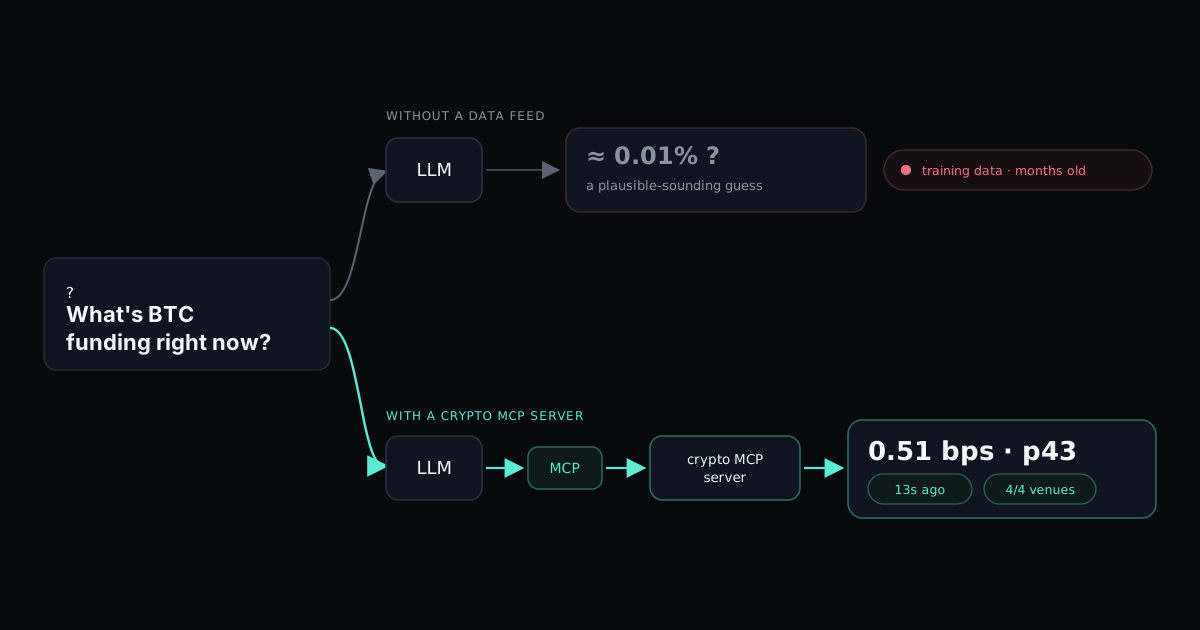
This guide covers what MCP servers do, how to connect one to each major AI client, and which crypto servers to connect, sorted by the data they serve: prices, news, onchain state, and derivatives microstructure. We run one of them (the MarketTrace agent feed, perps microstructure), so where the honest answer is "use someone else's server for that", we say so.
What is an MCP server?
MCP (Model Context Protocol) is an open protocol, released by Anthropic in late 2024 and since adopted by OpenAI and Google, that standardizes how AI models call external tools. Before MCP, every data integration was a custom plugin for one specific chatbot. With MCP, a server describes its tools once ("get_price returns the current price for a symbol") and any compliant client can discover and call them.
An MCP server is the thing on the other end: a small service that exposes those tools. It can run locally on your machine or remotely as a hosted endpoint you connect by URL. When you ask a question the model can't answer from memory, it picks a tool, calls it, and folds the response into its answer. The full walkthrough, from the three roles to MCP vs API, is in what an MCP server is.
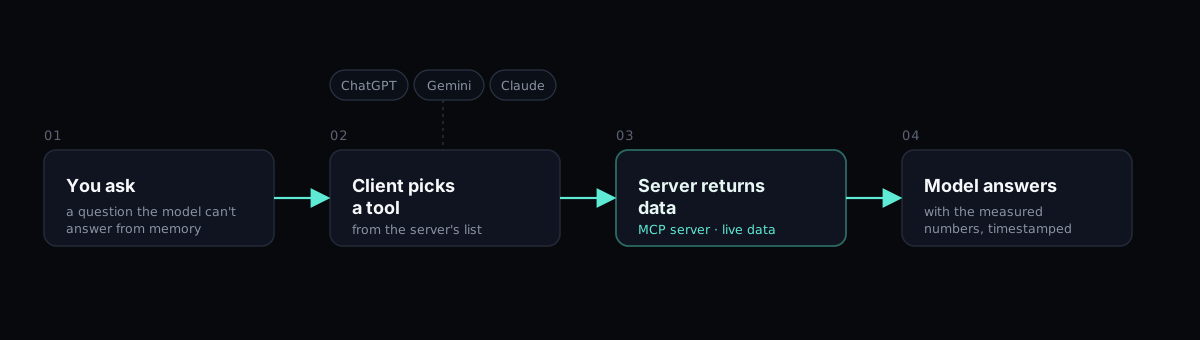
For crypto this matters more than for most domains. Markets move 24/7, models are trained on snapshots, and the gap between the two is where hallucinated prices come from.
Why traders bother
Three things change once an assistant has a data feed behind it.
First, numbers stop being guesses. A model with no tools will answer "what's ETH open interest?" with something plausible-sounding. A model with a connected feed answers with the actual figure and, if the server is built properly, tells you when it was measured and which exchanges it covers.
Second, you can ask compound questions that would take four browser tabs to answer by hand. "Compare BTC funding across exchanges, then show me how open interest moved over the last three days" is one prompt. The assistant makes several tool calls and assembles the answer.
Third, the assistant does the reading, you keep the judgment. A data server can't and shouldn't tell you what to trade. What it does is put measured history and live state in front of whatever reasoning you were going to do anyway.
What MCP does not do: it doesn't make the model smarter, it doesn't predict anything, and a connected assistant is still capable of misreading the data it fetched. The feed removes one class of errors, stale and invented numbers. The rest is still on the model and on you.
How to connect a crypto MCP server
Hosted servers connect by URL. Self-hosted ones run on your machine and connect through a config file. The URL kind is the retail path; here it is per client, using our feed's endpoint (https://api.markettrace.ai/mcp) as the running example. Any hosted server URL works the same way. Ours asks you to sign in with an emailed link, and that link only works on the same device and in the same browser where you started.
ChatGPT
Custom MCP connectors live behind developer mode, on paid plans (Plus and up).
- Settings → Apps & Connectors → Advanced settings → enable Developer mode.
- Settings → Connectors → Create.
- Paste the server URL, name it, save.
- In a chat, enable the connector and ask away.
OpenAI added full MCP tool support to developer mode in October 2025. It works, with one caveat: ChatGPT is aggressive about confirming tool calls, so expect an approval click now and then.
Gemini
The Gemini web and mobile apps don't take custom MCP connectors yet. The supported path is Gemini CLI, Google's free terminal client, which reads MCP servers from a JSON config:
// ~/.gemini/settings.json
{
  "mcpServers": {
    "markettrace": {
      "httpUrl": "https://api.markettrace.ai/mcp"
    }
  }
}
Start gemini, and the tools are available in conversation. Not as smooth as a settings toggle, but it works on the free tier, unlike ChatGPT, where custom connectors sit behind a paid plan.
Claude
- Settings → Connectors → Add custom connector (all plans; Free is capped at one custom connector).
- Paste the server URL.
- Authorize when prompted.
Claude Code needs two terminal commands. The first only registers the server; until you run the second, it sits at "Needs authentication".
claude mcp add --transport http markettrace https://api.markettrace.ai/mcp
claude mcp login markettrace
The second command opens your browser to sign in. If your Claude Code doesn't have mcp login yet, start a session, type /mcp, pick markettrace and choose Authenticate.
Codex
OpenAI's Codex CLI works the same way: add the server, then sign in.
codex mcp add markettrace --url https://api.markettrace.ai/mcp
codex mcp login markettrace
Everything else
Cursor, Windsurf, LM Studio and most agent frameworks speak MCP natively; stdio-only clients bridge to hosted servers with npx -y mcp-remote <url>. If your tool of choice shipped after mid-2025, it almost certainly supports MCP.
Crypto MCP servers, by what they actually serve
"Best crypto MCP server" is the wrong question. Servers differ by data type, and the honest comparison is category by category. Here is the field as of mid-2026.
| Server | Data | Free | Auth | Can it act? |
|---|---|---|---|---|
| CoinGecko MCP | Spot prices, market caps, OHLCV, DEX/onchain via GeckoTerminal | Yes (rate-limited) | None | No, read-only |
| Crypto.com MCP | Spot prices, market data | Yes | None | No, read-only |
| CoinMarketCap (community) | Coin listings, quotes | Free tier | CMC API key | No, read-only |
| CCXT MCP (community) | Exchange market data, 100+ venues | Yes (self-host) | Optional exchange keys | Depends on config |
| CryptoPanic MCP | News headlines | Yes (self-host) | API key | No |
| Fear & Greed MCP | Sentiment index | Yes (self-host) | None | No |
| Bankless Onchain MCP | Token balances, contract state | Yes (self-host) | API key | No |
| Whale Tracker MCP | Large-transaction alerts | Yes (self-host) | API key | No |
| GOAT / Solana Agent Kit | Onchain actions, 200+/40+ | SDK | Wallet keys | Yes, executes transactions |
| MarketTrace agent feed | Perps microstructure: funding + percentiles, OI, CVD, order book imbalance, liquidations, basis | Yes | OAuth, no keys | No, read-only |
Prices and market caps: CoinGecko
For "what's the price of X" across fifteen thousand coins, CoinGecko's official server is the sensible default. It's hosted, keyless, and covers OHLCV history plus onchain DEX data through GeckoTerminal. Rate limits are shared on the free endpoint, fine for conversation, not for polling. Crypto.com's server does similar price work with a smaller surface.
News and sentiment: CryptoPanic, Fear & Greed
Both are small community servers you run locally. Headlines and a sentiment index are useful context, and neither pretends to be more than that.
Onchain state: Bankless, EVM servers, whale trackers
Token balances, contract reads, large-transfer alerts. Wallet-level truth, one block behind reality.
Execution: GOAT, Solana Agent Kit, and why to pause
These servers don't read markets, they act on them: swaps, transfers, protocol calls, with your wallet keys in scope. That's a different risk class from everything above, and connecting one to a chat assistant means a mis-parsed sentence can move funds. If you experiment, use a burner wallet with test-sized balances. We don't run execution tooling and this guide doesn't cover it further.
Derivatives microstructure: the gap we built for
Every server above answers "what is the price" or "what happened onchain". None of them answer the questions perps traders trade on: is funding stretched relative to its own history, which side just got liquidated, is the order book leaning, is aggression confirming the move.
That's the gap MarketTrace's crypto MCP server fills, and it does four things no other server in this table does.
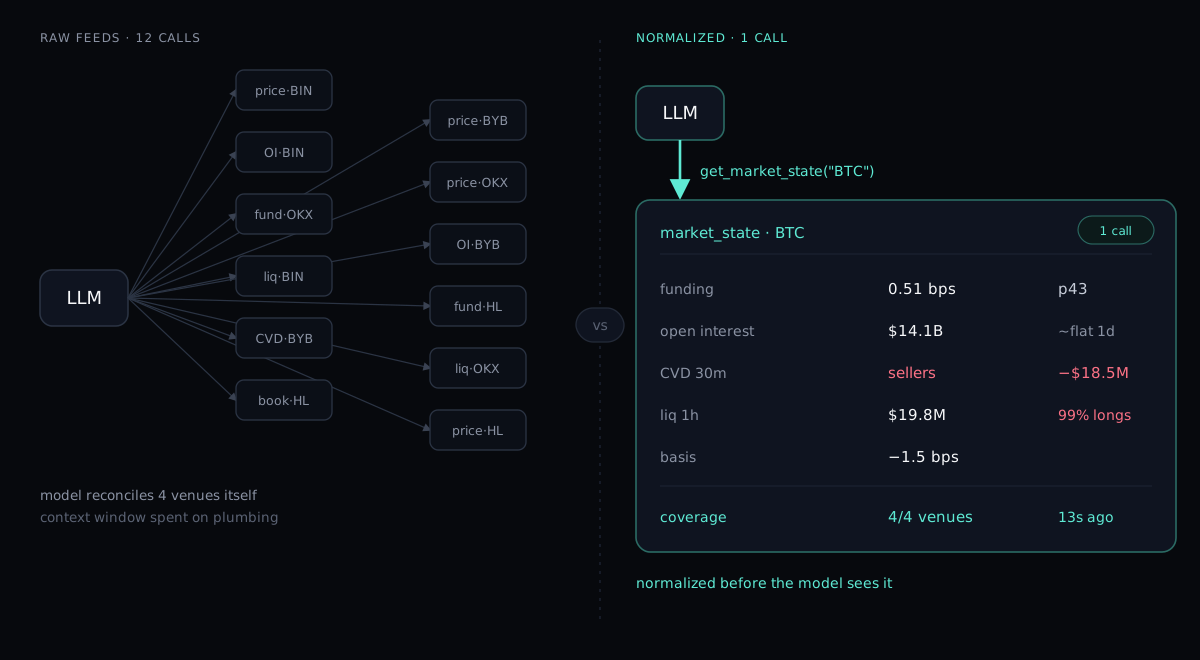
One call, whole picture. get_market_state returns a single normalized snapshot per asset: funding, open interest, volume, cumulative volume delta, order book imbalance, liquidations, basis and the drivers behind them, already aggregated across Binance, Bybit, OKX and Hyperliquid. A price server would need a dozen calls and would still leave the model to reconcile four exchanges' numbers itself, burning context window on plumbing. Here the normalization is done before the model sees it.
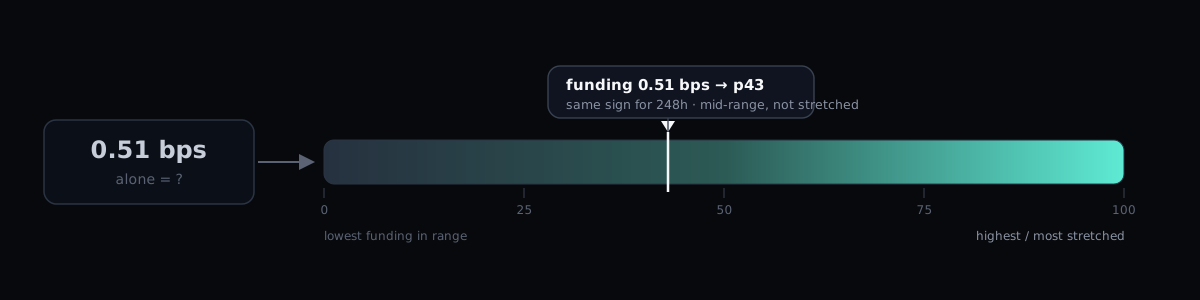
Percentiles, not raw numbers. A funding rate of 0.0051% means nothing on its own. The feed ranks the current rate against multi-year history and answers "43rd percentile, same sign for 248 hours". No other public crypto MCP ships funding percentiles at all. For a model reasoning about whether positioning is stretched, the percentile is the difference between an answer and a shrug.
Base rates instead of folklore. get_conditional_outcomes returns measured forward returns after a stated condition: "after funding above the 90th percentile, here's what happened over the next N hours, across M occurrences". Crypto Twitter answers this question from vibes. The feed answers it from an archive, and when the sample is too thin to mean anything, it says history_silent instead of inventing a pattern.
Trust is declared, not assumed. Every metric carries its own coverage: which venues reported, how deep the window is, how fresh the number. When Hyperliquid data is missing from a liquidation total, the response says so. An agent (or you) can weight the answer accordingly instead of treating every number as equally solid.
The practical difference: connect a price server and ask "is ETH positioning stretched?", and the model gets a price and starts improvising. Connect this feed and the same question comes back grounded: funding percentile, OI trend, CVD lean, liquidation skew, each with its coverage attached. The reasoning is still the model's. The evidence is measured.
Free, hosted, OAuth by email magic link, read-only by design. Two honest caveats. Nine assets only (BTC, ETH, SOL, BNB, XRP, DOGE, HYPE, ZEC, ENA), so if you trade long-tail alts, pair it with CoinGecko. And it reports history and current state, never predictions; if you want an AI that says "long here", this isn't it, and we'd argue nothing should be.
What to ask once connected
Prompts that use a data feed well are specific about the measurement:
- "What's the market state for BTC right now, and is positioning stretched by its own historical standards?"
- "How much got liquidated on ETH in the last hour, longs or shorts?"
- "Show funding across exchanges for SOL. Is any venue diverging?"
- "What happened historically after funding above the 90th percentile? Give me base rates, not opinions."
- "Pull the 4h candles and tell me where current OI sits relative to the last two weeks."
The pattern: ask for measurements and comparisons, let the model assemble them, and keep the "so what do I do" step for yourself. For a deeper walkthrough of the metrics themselves, see the order flow trading guide or the live funding term structure.
Security: five rules before you connect anything
MCP is young and its security culture is younger. The rules that matter:
- Prefer read-only servers. A feed that can only report data can waste your time at worst. A server holding wallet or exchange keys can lose money.
- Prefer OAuth over pasted API keys. Keys in config files leak; scoped OAuth grants get revoked in one click.
- Know the operator. A malicious server can inject instructions into tool responses (prompt injection). Connect servers from operators you can name, and check what a listing links back to.
- Watch what the client approves. ChatGPT's confirmation prompts are annoying by design. Don't train yourself to click through them.
- Never connect execution servers to accounts that matter. Burner wallets exist for a reason.
FAQ
Are crypto MCP servers free?
The major hosted ones are: CoinGecko, Crypto.com and MarketTrace all run free endpoints with no API key. Self-hosted community servers are free to run but often need a free-tier key for the underlying data source.
Which AI clients support MCP?
Claude (web, desktop, Claude Code), ChatGPT (paid plans, developer mode), Gemini CLI, Cursor, Windsurf, and most agent frameworks. The Gemini consumer app doesn't take custom connectors yet.
Can an MCP server trade for me?
Read-only data servers can't, by construction. Execution servers such as GOAT and Solana Agent Kit can, which is exactly why they deserve separate caution. Check the "can it act" column before connecting anything.
What's the difference between an MCP server and an API?
An API needs you (or your code) to call it. An MCP server describes its tools to the model so the model calls them itself mid-conversation. Same data underneath, different consumer.
What's the best crypto MCP server?
Depends on the question you're asking. Prices across thousands of coins: CoinGecko. Headlines: CryptoPanic. Onchain balances: Bankless. Perps microstructure, funding percentiles, liquidations, CVD: that's ours, and it's the only one in the table built for it.
Do I need to code?
No. Hosted servers connect by pasting a URL into your client's settings. Only self-hosted community servers need a terminal.
The MarketTrace agent feed is free and read-only: markettrace.ai/agents. Informational market data, not financial advice.