What is an MCP server? Model Context Protocol, explained for traders
What an MCP server is, how the Model Context Protocol works, MCP vs API, which AI apps speak it, and what a live market-data server changes for traders.
At 10:44 UTC on October 7, 2026, Bitcoin perps had liquidated $7.5 million in the previous hour, 99% of it longs, the 94th-percentile hour of the week. Funding sat at the 22nd percentile of its two-year history. Volume ran 2.3 times the weekly median. An AI assistant with no tools knows none of this. It was trained months ago and has no clock. The same assistant with an MCP server connected gets that paragraph back from one call, with a timestamp and the list of exchanges behind each number.
That is the whole pitch of MCP for anyone who works with markets. The model stops guessing and starts reading.
What MCP is, and what it is not
MCP stands for Model Context Protocol. Anthropic published it in November 2024 as an open standard, and on December 9, 2025 donated it to the Agentic AI Foundation, a Linux Foundation body it co-founded with OpenAI and Block, with Google, Microsoft, AWS, Cloudflare and Bloomberg as supporting members. The announcement put the count at more than 10,000 public servers and 97 million SDK downloads a month.
Underneath, it is a wire protocol: JSON-RPC 2.0 messages between an AI application and a tool provider. The protocol defines how the app discovers what a server offers, how it calls a tool, and what comes back. It says nothing about which model you use or how that model reasons.
Three things MCP is not. It is not a model or an agent framework. It is not a replacement for an API; most MCP servers are thin layers over one. And it is not a marketplace, although several directories have grown around it.
One note on the meaning of MCP outside AI, since the acronym is crowded. Elsewhere it can mean Microsoft Certified Professional, the Master Control Program from Tron, or the knuckle joint at the base of a finger. In anything written about AI tools since late 2024, it means the protocol. The short definition lives in the MCP glossary entry; this page is the long version.
Host, client, server: the three parts
The protocol names three roles, and most confusion about MCP comes from mixing them up.
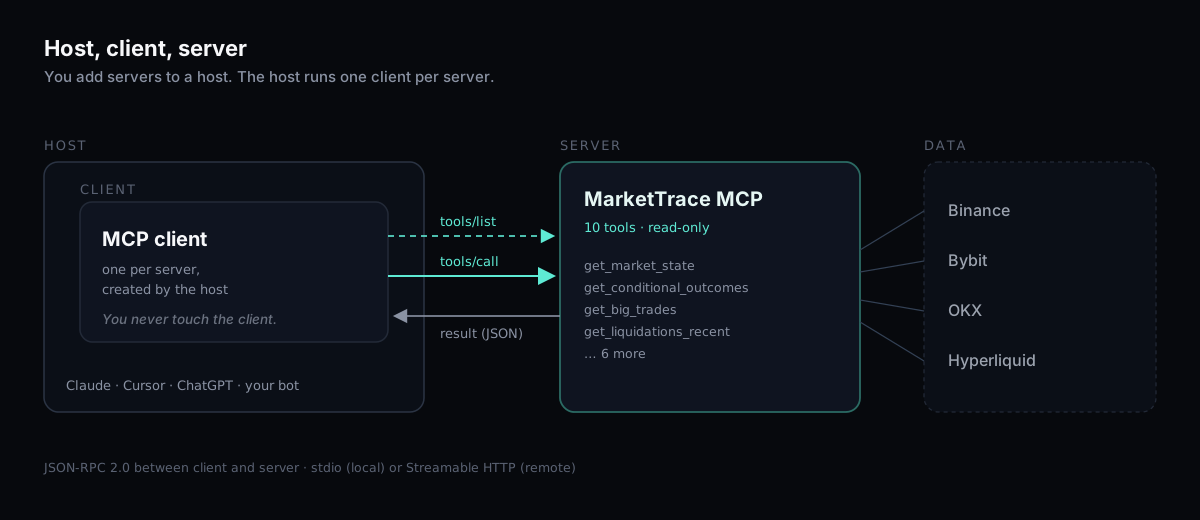
The host is the application you talk to: Claude, ChatGPT, Cursor, VS Code, Gemini CLI, or a bot you wrote. The client is the connector inside the host, one per server, that speaks the protocol on the host's behalf. The server is the program on the other end that exposes capabilities. You never operate the client yourself; the host creates one when you add a server.
A server can expose three kinds of things. Tools are functions the model may call, each with a name, a description and a JSON schema for its arguments. Resources are data the host can read into context, such as files or records. Prompts are reusable templates. Market-data servers are tools-only in practice: there is no file to read, only questions to answer.
Tools also carry annotations, and the one that matters for a trader is readOnlyHint. A tool marked read-only promises to change nothing. A server where every tool is read-only cannot place an order, move funds or touch an exchange account, whatever the model decides to do with it.
What an MCP server actually does, step by step
Here is the sequence for one question, as a worked MCP server example on a real server.

- You add the server to your client, as a URL or a local command, and sign in if it asks.
- The client calls
tools/list. The server replies with its tools: names, descriptions, input schemas. On the MarketTrace server that is ten tools, fromget_market_statetoget_stacked_imbalances. - You ask: "What's the market state for BTC? Is positioning stretched?"
- The model reads the tool descriptions, picks
get_market_stateand fills in{"symbol": "BTC"}. The client sends atools/callrequest. - The server answers with JSON. Trimmed, from 10:44 UTC on October 7:
{
  "symbol": "BTC",
  "as_of": "2026-10-07T10:44:00Z",
  "age_seconds": 40,
  "price": { "last": 83623.363, "chg_1h_pct": -0.17, "chg_24h_pct": -2.93, "atr_1h_pct": 0.39 },
  "funding": { "rate_bps": 0.22, "percentile": 22, "streak_h": 704 },
  "oi": { "usd": 19078227031, "chg_1h_pct": 0.19, "rel": { "1d": 0.9978, "1w": 1.0185, "1m": 1.0456 } },
  "volume": { "usd_24h": 26320186238, "rel": { "1w": 2.3451 } },
  "cvd": { "window": "30m", "delta_usd": 24887886, "taker_buy_ratio": 0.5193 },
  "obi": { "skew": -0.0891 },
  "liq": { "usd_1h": 7494656, "long_ratio": 0.9935, "percentile": { "1w": 94, "1m": 98 } },
  "basis_bps": -5.95,
  "drivers": [
    "funding 22nd pct (730d, binance+bybit+hyperliquid)",
    "OI 1.0x monthly median",
    "volume 2.3x weekly median",
    "liq 94th pct (1w), 99% longs",
    "OI +0.2%/1h, price -0.2% — new shorts"
  ],
  "coverage": {
    "funding": { "venues": ["binance", "bybit", "hyperliquid"], "window_days": 730, "partial": false },
    "liq": { "venues": ["binance", "bybit", "okx"], "partial": false },
    "basis": { "venues": ["binance"], "partial": true }
  },
  "stale_venues": [],
  "feed": { "version": "1.9.0", "tools": 10 }
}
- The model writes the answer in plain language. A good one keeps the caveats that came with the data: the funding percentile rests on three venues over 730 days, liquidations exclude Hyperliquid, the snapshot was 40 seconds old when it arrived.
Two details decide whether this works well. The first is the tool description, because the model chooses tools by reading them; a vague description gets a tool skipped or misused. The second is response design. A model pays for every token it reads, so a server that returns one compact object per asset, already normalized across exchanges, beats one that dumps a raw order book and leaves the arithmetic to the model.
Local or remote: where the server runs
Servers come in two shapes, and the difference matters more than any other setup detail.
A local server is a process on your machine, started by the client and spoken to over standard input and output, stdio in the config files. Filesystem tools, git tools and database tools work this way. You add them with a small JSON entry that tells the client which command to run.
A remote MCP server is a hosted endpoint you reach over HTTPS. The transport is called Streamable HTTP: the client posts JSON-RPC messages to one URL and the server streams a response back when it has more than one thing to say. Sign-in uses OAuth 2.1 with PKCE, the same flow as "Sign in with Google" on a website, so there is no API key to paste and nothing secret in a config file. The client opens a browser, you approve, the client keeps a token.
Market data is remote by nature. The feed lives next to the exchange connections, not on your laptop, and one hosted server can serve the same tools to Claude on your phone and Cursor on your desk. For a hosted server the whole config is one line:
{ "mcpServers": { "markettrace": { "url": "https://api.markettrace.ai/mcp" } } }
The field name varies by client (url in Cursor, httpUrl in Gemini CLI, "type": "http" in VS Code), and chat apps such as Claude and ChatGPT take the URL in a settings form instead of a file.
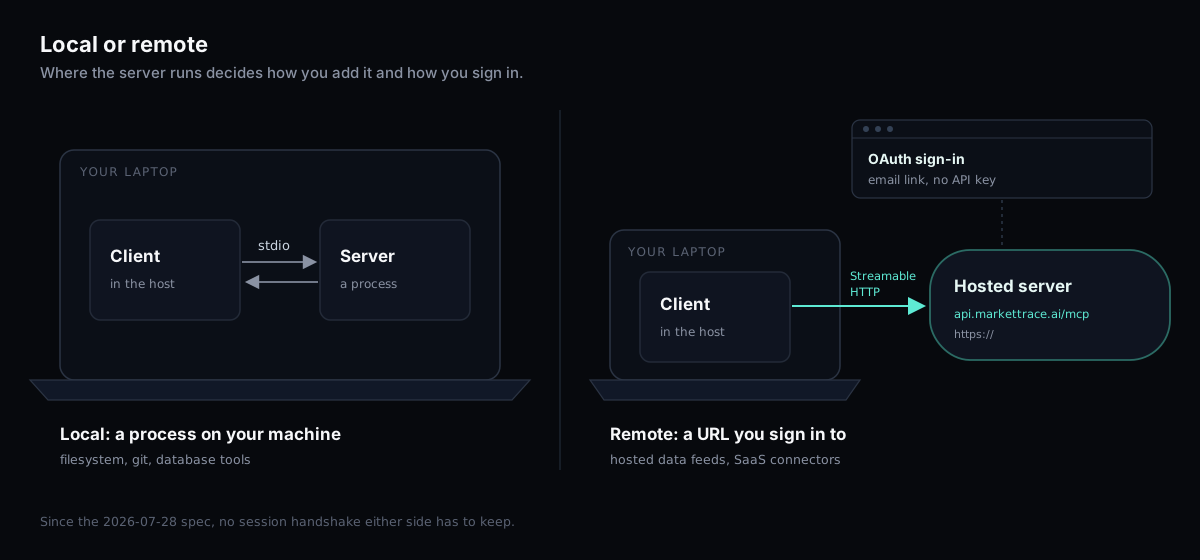
One recent change in the standard is worth knowing because it explains why hosted servers got simpler. The 2026-07-28 revision of the specification made MCP stateless: the session handshake and the session header are gone, and every request carries its own protocol version and client capabilities. A remote server now behaves like an ordinary web service. Nothing to resume when a connection drops, nothing for the server to remember between calls.
MCP vs API vs function calling
This is the most-asked question about MCP and the one with the most confused answers online, so here it is as a table.
| REST API | Function calling | MCP server | |
|---|---|---|---|
| Who consumes it | Your code | The model, inside one app | Any MCP-aware app, at runtime |
| How capabilities are found | You read the docs | The app hard-codes a function list into the prompt | The app calls tools/list |
| Arguments | Whatever the endpoint takes | JSON in the vendor's format | A JSON schema the server publishes |
| Sign-in | An API key you manage | None of its own | OAuth in the client, no key |
| Adding a capability | Write a client | Change the app's code | Add a server URL |
| What you still need | Your script | Your app | Nothing, if the server exists |
Function calling is the mechanism inside the model that lets it emit a structured call instead of prose. Every major vendor has a version of it. MCP sits one layer out: it is how a tool reaches the model from outside the application, with a schema the model can read, at runtime rather than at build time. An MCP server does not compete with function calling. It feeds it.
An API and an MCP server usually hold the same data. The difference is on the consumer side. With an API you write the client, handle auth, parse the response and decide what to show. With MCP, the AI application already is the client. For a trader that reduces to one sentence: with an API you write the script, with MCP you type the question.
The flip side is just as plain. If you already run a script against an API, MCP adds little. The protocol pays off when the consumer is a model.
Which apps speak MCP today
As of October 2026, here is how each common host takes a remote server. Claude connectors are MCP servers under another name: the built-in ones come from Anthropic's directory, and an MCP connector you add by URL is a custom connector. Plan rules changed twice this year and will change again, so check the vendor page before you count on one.
| Host | How to add a remote server | Plan notes |
|---|---|---|
| Claude (web, desktop) | Customize → Connectors → Add custom connector, paste the URL | Free (one connector), Pro, Max, Team, Enterprise. On Team and Enterprise an owner adds it first. (support page) |
| Claude Code | claude mcp add --transport http <name> <url>, then claude mcp login <name> | Included |
| Cursor | A url entry in mcp.json; many servers ship an "Add to Cursor" button | Included |
| ChatGPT | Developer mode under Apps → Advanced settings | Full MCP, including tools that write, is in beta on Business, Enterprise and Edu. Pro can connect servers with read and fetch permissions only. Plus and Free are not on OpenAI's list. (OpenAI help) |
| Codex | codex mcp add <name> --url <url>, then codex mcp login <name> | Included |
| VS Code, Gemini CLI | A config entry with the URL | Included |
| Anything stdio-only | The mcp-remote bridge |
The client-by-client steps for our server, with the sign-in flow spelled out, are on the agents page.
Where to find MCP servers, and how to judge one
The official MCP Registry at registry.modelcontextprotocol.io is the source of record. A server publishes a server.json there under a namespace tied to a domain the operator controls, and clients and directories read from it. Claude keeps its own directory of reviewed connectors. Independent directories such as mcp.so, Glama, Smithery and PulseMCP index thousands more, including whatever the GitHub awesome-lists collect.
"Best MCP servers" lists are mostly developer tools: GitHub, filesystem, Postgres, Playwright, Slack, Notion. Finance is thin, and crypto thinner. Our roundup of crypto MCP servers sorts what exists by the data it serves: prices, news, onchain state and derivatives microstructure.
Whatever the list, MCP security comes down to seven questions to ask before you connect a server to anything that matters.
- Are the tools read-only, and does the server say so with
readOnlyHint? - How do you sign in: OAuth, an API key, or nothing? Nothing is fine for public data. A key pasted into a config file is the weakest of the three.
- Does every response say when it was measured and from which sources?
- Are rate limits and error messages documented, so the model knows what a refusal looks like?
- Who runs it, and is the code public?
- Is it in the official registry under a namespace the operator owns, or only on a third-party directory?
- What does it log about you? The honest answer is "the tool calls", and a privacy page should say so. Ours lists every field the server logs and how long it keeps them.
A market-data server that passes all seven is rare. Ours passes six outright. On the fifth the honest answer is partial: the stdio bridge and the tool contract are MIT-licensed on GitHub, the data pipeline behind the hosted endpoint is not.
What a connected assistant changes for a trader
Most MCP use cases you will read about are developer tools: a model that reads your repo, your tickets, your database. Here are four from trading, each a question from the morning of October 7 answered by one tool call, each with what the model can and cannot conclude. The numbers are from the MarketTrace server at 10:44 UTC.
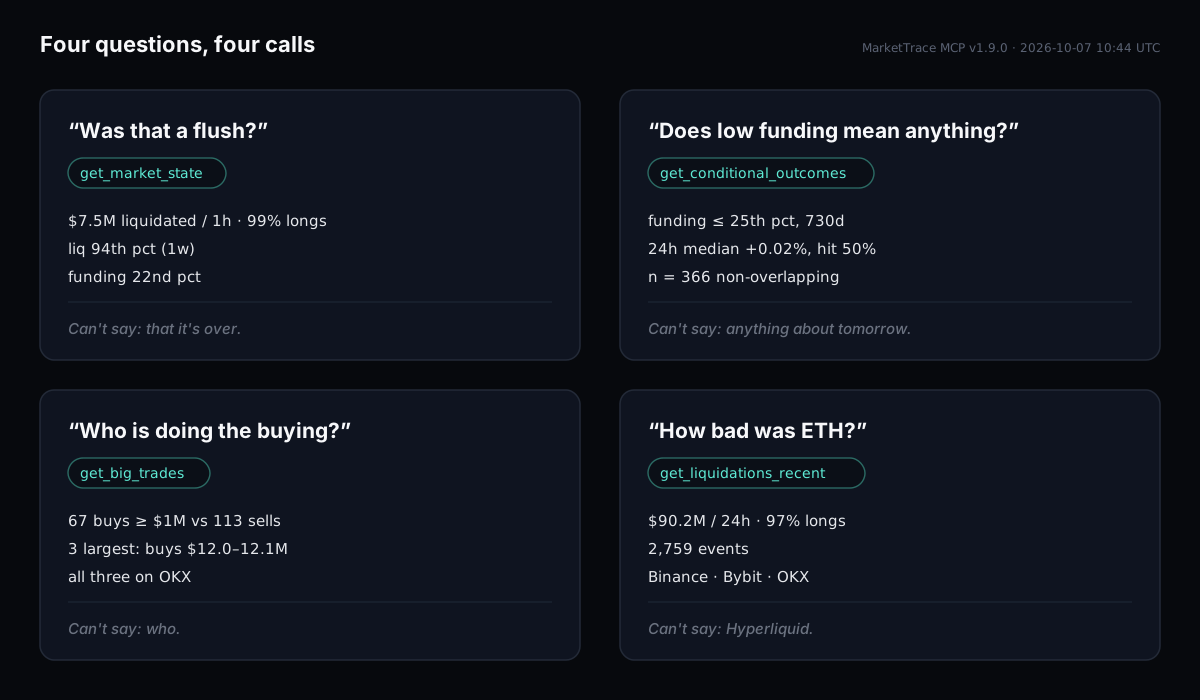
Was that a flush?
get_market_state for BTC: price down 2.9% in 24 hours, $7.5 million liquidated in the last hour and 99% of it longs, the 94th percentile of the week and the 98th of the month. Volume at 2.3 times the weekly median. Funding at the 22nd percentile and positive for 704 hours straight, so the crowd was never paying up to be long. Open interest within 5% of its monthly median. The model can say: a long flush on a day when funding never looked crowded, and the shorts opened into it are new (open interest up, price down over the hour). It cannot say the flush is finished.
Does low funding mean anything?
get_conditional_outcomes for BTC, condition: funding at or below the 25th percentile, window: the 730 days to October 7, 2026. Twenty-four hours later the median move was +0.02% with a 50% hit rate, across 366 non-overlapping matches. Seventy-two hours later, +0.42% and 54% across 155. That is a coin flip, reported as a measurement with its sample size. A model without the tool would have told you low funding marks bottoms, because that is what most of the internet says. The funding-rate extremes study runs the same test across six assets, and the conditional outcomes entry explains how matches are counted.
Who is doing the buying?
The same snapshot, per venue: 30-minute CVD at +$20.2 million on OKX and +$8.5 million on Bybit, against −$5.1 million on Binance. get_big_trades for the hour to 10:44: 67 market buys of $1 million or more against 113 sells, and the three largest prints, buys of $12.0 to $12.1 million each, all on OKX. The model can describe a venue split and name the side that printed size. It cannot know who was behind the orders.
How bad was ETH?
get_liquidations_recent with a 24-hour window: $90.2 million liquidated, 97% longs, 2,759 events, on Binance, Bybit and OKX. Hyperliquid is not in that feed, and a good answer says so instead of rounding the gap away.
None of these is a trade. What changed is that the assistant's sentences are now about measured things, dated and sourced, and the follow-up question costs one more call instead of four browser tabs. The same data sits on the liquidations and footprint pages for anyone who prefers a chart to a conversation.
Where "AI trading agent" starts and ends
An AI trading assistant that reads is a different thing from an AI trading agent that acts, and MCP only settles the first half. An MCP server gives an agent eyes. It does not give it judgment, and a read-only server cannot execute. An agent that trades needs a second, writable connection to an exchange, its own risk limits, and a person who reads the logs. That is a different project with a different failure mode. Keeping the data server read-only, and separate from anything that can send an order, is the one design rule we would not bend.
What MCP does not fix
Stale and invented numbers are the class of error MCP removes. Four others stay.
Interpretation. A model can fetch the right number and still read it wrong: call a 94th-percentile liquidation hour "capitulation" when the feed only says it was large, or treat rel: 2.3 as 2.3% instead of 2.3 times the median. The fix on the server side is to document scales in the tool description; on the user side, to ask the model to quote the field it used.
Token cost. Every byte a tool returns is read by the model and billed, and a chat app has a context budget. A full order book for four exchanges would blow through it on one call. This is why a well-built market-data server returns summaries, depth at a few bands, percentiles and a short list of drivers, and leaves raw tape on the chart.
Prompt injection through tool results. Text that comes back from a tool is untrusted input. A server that returns free text can, in principle, return instructions, and some models will follow them. Numeric outputs and read-only tools keep the blast radius small, which is the second reason to insist on both.
Limits and refusals. A server that answers 30 calls a minute will throttle a model that asks for 31, and the error it returns has to be readable by the model as well as by a human. Ours comes back as a tool error that says how many seconds to wait, and parameters outside a tool's range return an error instead of being silently trimmed.
MarketTrace publishes eight rules for agents reading the feed that cover these cases. They also work as a system prompt.
Try it in two minutes
The MarketTrace MCP server is free and read-only, and its bridge and tool contract are open source. The URL is https://api.markettrace.ai/mcp. Add it in your client, sign in with an email link when the browser opens, and ask the first question in plain words: "What's the market state for SOL, and how does funding compare with its history?" The agents page has the steps for each client, the tool reference and the limits; the methodology page explains how each number is computed.
FAQ
What does MCP stand for?
Model Context Protocol. It is an open standard, first published by Anthropic in November 2024 and governed since December 2025 by the Agentic AI Foundation under the Linux Foundation. In other fields the same letters mean Microsoft Certified Professional or a finger joint; in AI tooling they mean the protocol.
What is MCP, and what is an MCP server?
MCP is the standard that lets an AI application discover and call outside tools. An MCP server is a program that publishes a list of such tools with typed inputs, so the application can call them during a conversation and receive structured results.
How does MCP work?
The application lists the server's tools, the model reads their descriptions, and when a question needs one the model fills in the arguments and the application sends the call. The server returns JSON; the model turns it into an answer. Messages travel as JSON-RPC 2.0 over stdio for local servers or Streamable HTTP for remote ones.
Is an MCP server the same as an API?
No, but it usually wraps one. An API is built for your code to call. An MCP server is built for an AI application to call, with self-describing tools and a sign-in flow that works inside a chat app. The data behind both is often identical.
What is the difference between an MCP client and an MCP host?
The host is the application you use, such as Claude or Cursor. The client is the component inside the host that talks to one server. You add servers to a host; the host runs a client for each.
What is a remote MCP server?
A server you reach by URL over HTTPS instead of running on your own machine. It uses the Streamable HTTP transport and, when it needs to know who you are, OAuth sign-in. Hosted data feeds are remote servers; filesystem and git tools are usually local.
Do I need to code to use an MCP server?
No. In Claude, ChatGPT or Cursor you paste a URL and sign in. Code is needed only to build a server or to call one from your own program.
Is MCP free?
The protocol and its SDKs are open source and free. Individual servers set their own terms. The MarketTrace server is free with per-account rate limits.
Which AI apps support MCP?
Claude, Claude Code, ChatGPT (developer mode on Business, Enterprise and Edu plans), Cursor, VS Code, Gemini CLI, Codex, Microsoft Copilot, and any client built on the official SDKs. Plan limits differ by vendor and changed more than once in 2026.
Is it safe to connect an MCP server?
Safe enough when the tools are read-only, sign-in is OAuth rather than a pasted key, the operator is identifiable and the code is public. Treat anything that can write, send or spend as a separate decision with a separate review.
Can an MCP server trade for me?
A read-only one cannot, by construction. Servers that expose execution tools exist; they hold exchange credentials and should be treated like giving someone your API keys, because that is what they are.
Related
→ Crypto MCP servers: how to connect AI to live market data
→ MarketTrace for AI agents: connect, tools, limits
→ How the MCP numbers are computed
→ Extreme funding rates: what 789 days of data actually show
Sources
- Donating the Model Context Protocol and establishing the Agentic AI Foundation, Anthropic
- Specification changelog, 2026-07-28, Model Context Protocol
- Get started with custom connectors using remote MCP, Claude Help Center
- Developer mode and full MCP connectors in ChatGPT, OpenAI Help Center
The MarketTrace MCP server is free and read-only: markettrace.ai/agents. Informational market data, not financial advice.